Slides
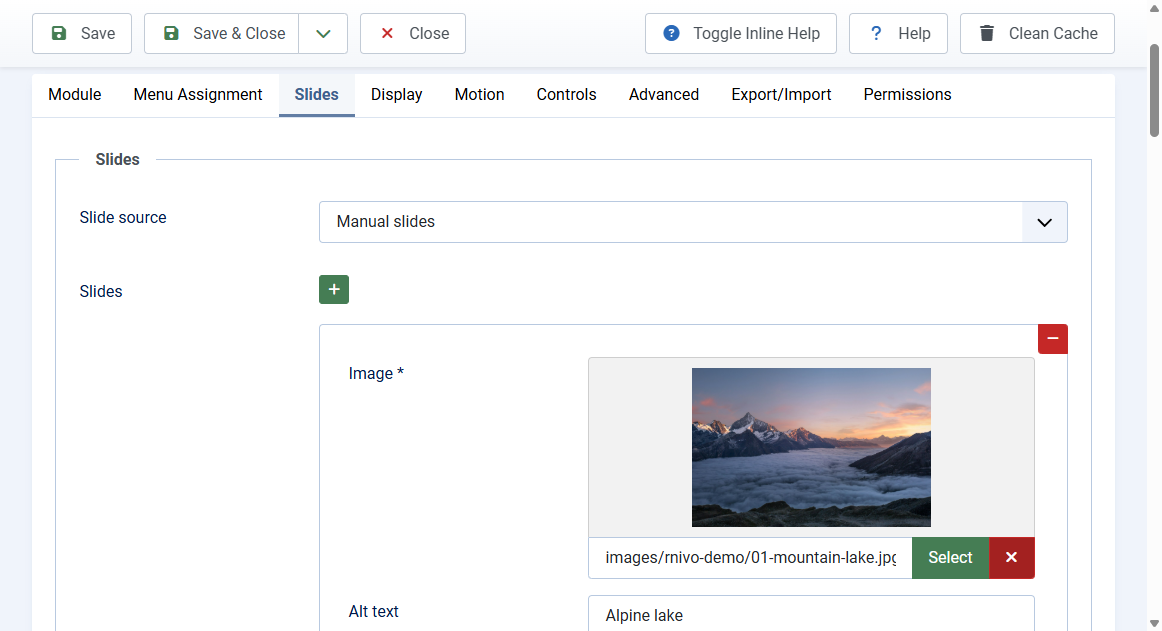
Open the module and click the Slides tab. This is where the images come from.
Manual slides
Default source. Each row can have:
- Image (required): Media Manager file or an http(s) image URL
- Alt text
- Eyebrow, Title, Description: plain text. Empty fields leave no hole in the caption
- Link: optional URL. Internal paths such as
/aboutare allowed.javascript:links are rejected - Link target: Same window or New window. New window adds
rel="noopener" - Slide interval (ms): 0 uses the module interval. A positive value overrides autoplay for that slide only
Use Add, Remove, and Move to reorder rows. Rows with a missing image are skipped.
Image folder
- Set Slide source to Image folder
- Pick a folder under
images/ - JPEG, PNG, GIF, WebP, and AVIF files load in filename order
- The filename becomes the alt text. Folder slides have no captions in 3.5
Joomla articles
- Set Slide source to Joomla articles
- Pick one or more categories, a count (1 to 30), order, and featured filter
- Each slide uses the intro image, title, introtext (plain), and article URL
- Items with no intro image are skipped
- Exclude current article hides the article being viewed
Empty source
If no slides remain after skipping bad rows, the module renders nothing. You will not see empty chrome or a JavaScript error.