Edit Listing Form
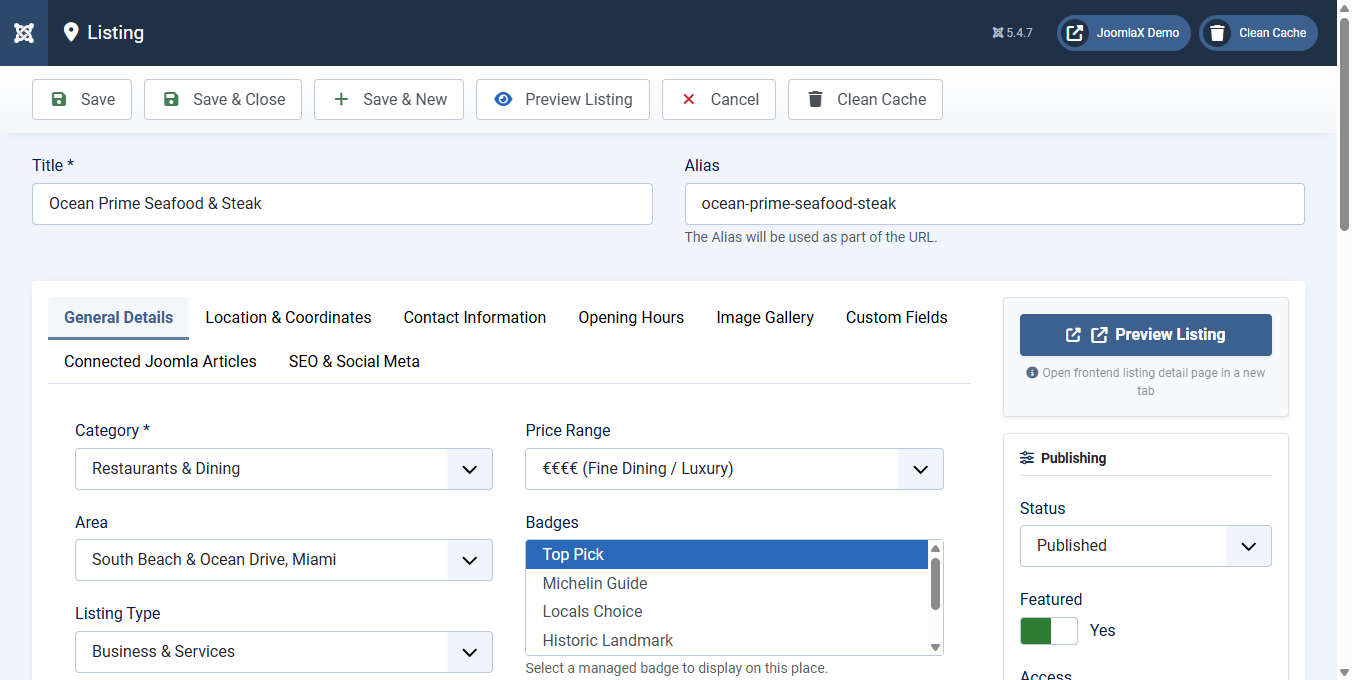
When creating or editing a listing under Components > Easy Directory > Listings, fields are organized into tabs:
- General Details: Title, Alias, Category, Area, Listing Type, Price Range (€ to €€€€), Badges, Verified Place badge toggle, Main Photo with media picker, Image Caption, Short Summary, and Rich Text Full Description.
- Location & Coordinates: Street Address, Latitude, Longitude, and an Interactive Map Coordinate Picker where you can click or drag to pinpoint exact locations.
- Contact Information: Phone Number, Email, Website URL, Contact Manager name, WhatsApp direct number/link, and dynamic Social Media Profiles (Facebook, Instagram, X, LinkedIn, TikTok, YouTube, and more).
- Opening Hours: Structured weekly opening and closing hours for Monday through Sunday, including Open/Closed toggles and split shifts.
- Image Gallery: Reorderable gallery photos via Joomla Media Manager or auto-populate from an images directory.
- Custom Fields: Dynamic custom field inputs scoped to the listing category (for example: Cuisine, Atmosphere, Valet Parking, Wi-Fi, Accessibility).
- Connected Joomla Articles: Connect related articles or display recent stories from an article category.
- SEO & Social Meta: Custom Meta Title, Meta Description, Keywords, and Schema.org overrides.