Data Export
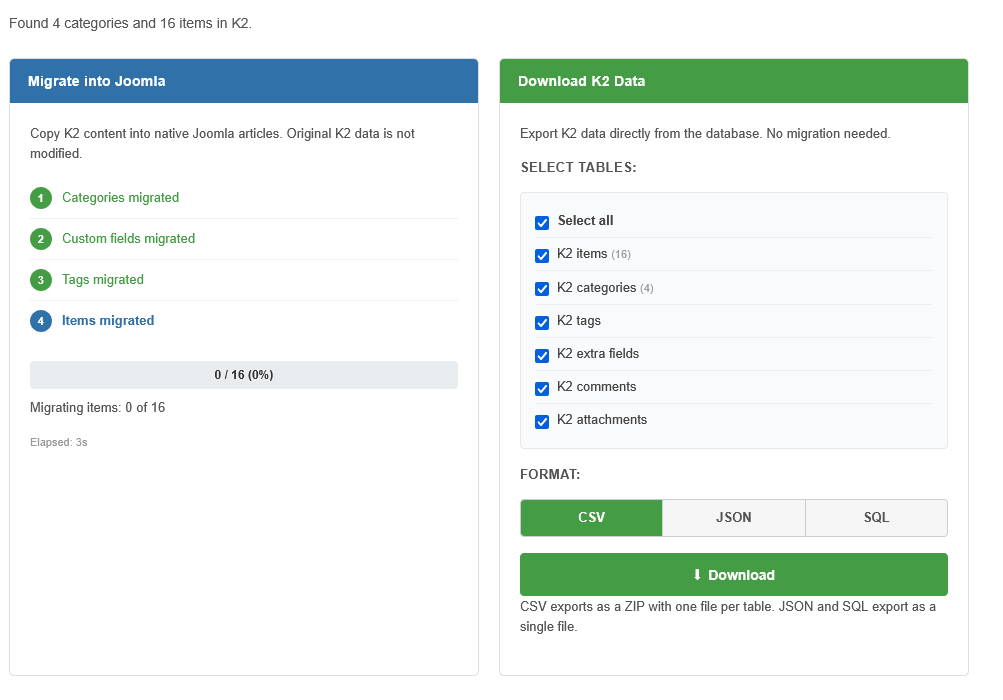
Export Overview
MigrateK2 Pro lets you download raw K2 data directly from your database — no migration required. This is useful for archiving, importing into other systems, or analyzing your K2 content externally.
Quick Export (Dashboard)
The dashboard provides one-click export buttons for all K2 tables at once:
- CSV — downloads a ZIP file containing one CSV file per K2 table
- JSON — downloads a single structured JSON file
- SQL — downloads a file with INSERT statements
Selective Export (Migration Page)
For more control, use the "Download K2 Data" panel on the Migration page:
- Go to Components > MigrateK2 Pro > View Migration Details
- In the right panel, check the tables you want to export:
- K2 items — articles with full content, metadata, and settings
- K2 categories — category hierarchy with descriptions
- K2 tags — all K2 tags
- K2 extra fields — custom field definitions and values
- K2 comments — user comments on K2 items
- K2 attachments — file attachments linked to K2 items
- Use Select All to check/uncheck everything
- Choose your format: CSV, JSON, or SQL
- Click Download
Format Details
CSV Format:
- Downloads as a ZIP file named
k2_export_csv_YYYY-MM-DD.zip - Contains one CSV file per selected table (e.g.,
k2_items.csv,k2_categories.csv) - UTF-8 encoded with BOM for proper Excel compatibility
- First row contains column headers
JSON Format:
- Downloads as
k2_export_YYYY-MM-DD.json - Single file with a structured object:
{"items": [...], "categories": [...], ...} - UTF-8 encoded with pretty-printed formatting
- Ideal for programmatic processing or API import
SQL Format:
- Downloads as
k2_export_YYYY-MM-DD.sql - Contains INSERT INTO statements for each selected table
- Table names use the Joomla prefix placeholder
#__ - Can be imported directly into another Joomla database using phpMyAdmin or CLI
Use Cases
- Archiving: Download a complete backup of all K2 content before removing K2
- WordPress migration: Export as CSV or JSON and use a WordPress importer
- Data analysis: Open CSV files in Excel or Google Sheets for content audits
- External backup: Keep an off-site copy of your K2 content independent of your Joomla database