Module Settings
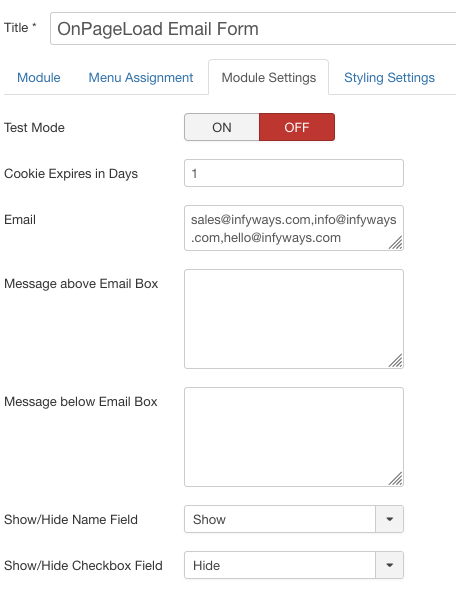
- Test Mode: ON disables cookie persistence so you can preview the popup repeatedly. Set OFF when the live site is ready.
- Trigger: Page Load (optional delay ms), Scroll %, Exit Intent, or Click (CSS selector).
- Cookie Expires in Days: How long to wait before showing the popup again after a successful submit.
- Cookie on Dismiss: Also store the cookie when the visitor closes without submitting.
- Recipient Email: One or more addresses (comma-separated) for submission notifications.
- Popup Title / Badge Text / Messages: Title, badge, message above the form, message below (terms HTML allowed), and success message.
- Redirect after Submit: Optional URL after a successful submit.
- Name / Phone / Checkbox: Show or hide optional fields.
- Show Close Button: ON allows X, Esc, and overlay dismiss. OFF keeps a stricter email gate.
- Spam Honeypot: Hidden field that blocks simple bots.