How to
How do I build shortcodes without typing them?
Edit any article and click the Pop Any Article button in the editor toolbar. Choose a template, adjust options in the tabs, and click insert. A live preview shows the shortcode before it is added.
How do I hide the article title in the popup?
Either set Article Title Inside Popup → Hide in plugin settings for all popups, or add showtitle="false" on a single shortcode. Use showtitle="true" to force the header when the global setting is Hide.
How do shareable popup links work?
With Hash / Deep Links enabled, opening a popup updates the URL to e.g. #popart-285. Copy that URL — reloading the page opens the same popup. Use hashslug="custom-name" for a readable hash.
How do I create a popup gallery?
Give multiple shortcodes the same rel value (e.g. rel="portfolio"). When one popup is open, visitors can use arrow keys, on-screen arrows, or swipe on mobile to move between articles in the group.
When should I use lazy loading?
Enable lazy load when a page has many popups or large articles. Content is fetched on first click, keeping the initial page HTML lighter. Use lazy="false" on a shortcode when you need content embedded immediately.
How do I add Font Awesome icons?
Add icon="fa-search" (Font Awesome 4 syntax) to a text or image shortcode. Ensure Font Awesome is set to Yes in plugin settings, or that your template already loads Font Awesome.
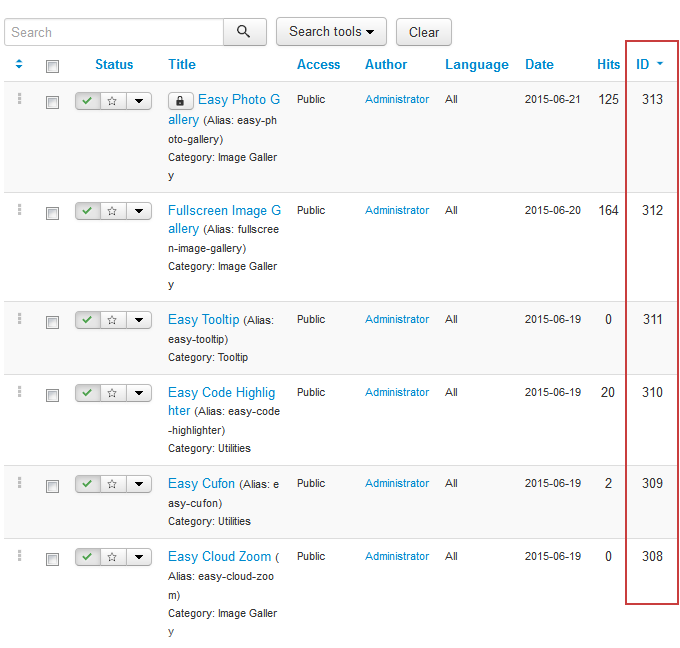
How do I get a Joomla article ID?
Go to Content → Articles. The ID column shows each article's numeric ID. Use that number in article="…".
Modern vs Classic theme — which should I use?
Modern (2026) is recommended for new sites: blur overlay, rounded panel, smooth zoom animations, and updated ibtn button styling. Classic keeps the legacy Fancybox appearance with pattern backgrounds and image-based close buttons.