Plugin Settings
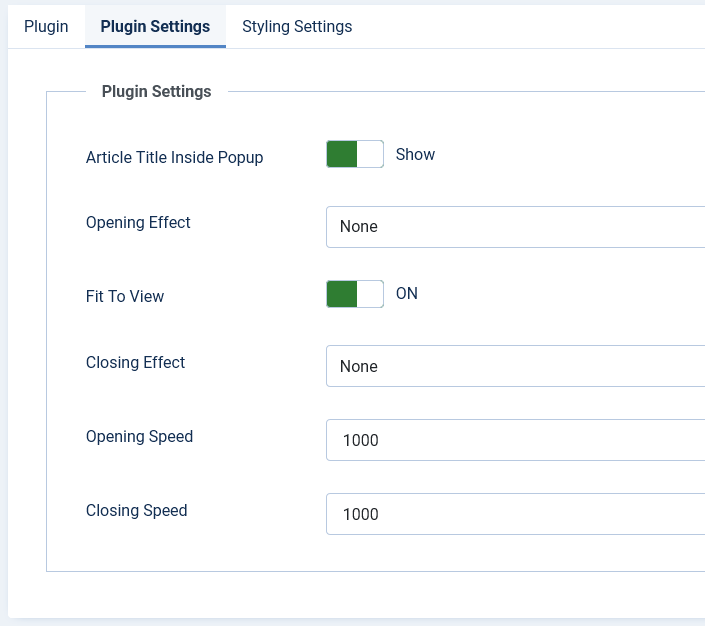
Core popup behaviour is configured under System - Pop Any Article → Plugin tab.
- Article Title Inside Popup: Show or hide the article title/header bar globally. Override per shortcode with
showtitle="true"orshowtitle="false". - Opening / Closing Effect: None, Fade, Zoom (Modern), Slide up, Slide down, or Elastic. Zoom and slide effects are optimised for the Modern theme.
- Opening / Closing Speed: Duration in milliseconds (defaults: 380 ms open, 280 ms close). Values above 500 ms are capped automatically in Modern theme.
- Fit To View: When ON, the popup resizes to fit inside the viewport on tablets and phones.
- Hash / Deep Links: When ON, opening a popup updates the URL hash (e.g.
#popart-285). Visitors can bookmark or share the link. Override withhash="false"on a shortcode. - Lazy Load Popup Content: When ON, article HTML is fetched via AJAX on first open instead of embedding it in the page. Override with
lazy="false". - Gallery Next / Prev Arrows: When ON, triggers that share the same
relvalue become a navigable gallery with on-screen arrows and keyboard support. - Gallery Swipe on Mobile: When ON, swipe left/right on touch devices to move between gallery items in the same
relgroup. - Font Awesome: Set to No if your template already loads Font Awesome.