API keys and models
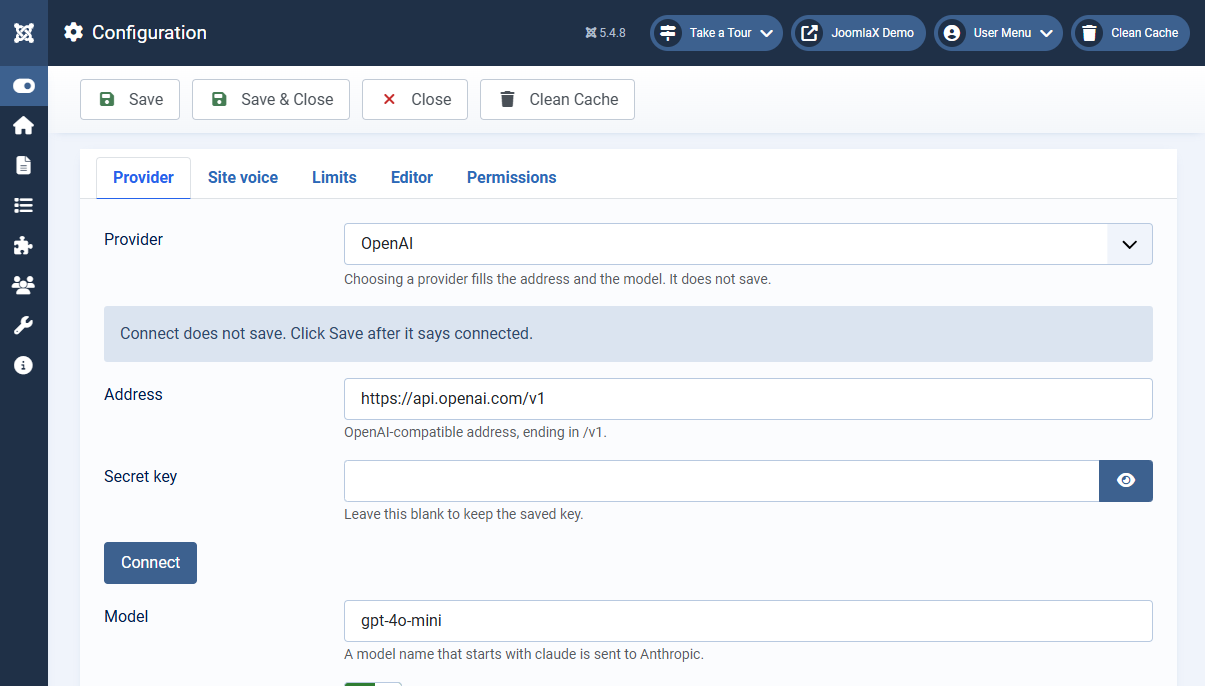
The key stays in Configuration on your server. It is never sent to the browser. Leave the Secret key field blank on later saves to keep the stored key.
- Open Components > Easy AI Writer > Configuration > Provider.
- Choose the provider. The address and the model fill in. Choosing does not save anything.
- Paste the key, click Connect to check that the provider accepts it, then click Save. Connect does not save the key.
OpenAI
- Choose OpenAI. The address becomes
https://api.openai.com/v1and the model becomesgpt-4o-mini. - Open platform.openai.com/api-keys, create a secret key, and copy it. OpenAI shows the full key only once.
- Paste it into Secret key, click Connect, then Save.
Anthropic Claude
- Choose Anthropic Claude. The model becomes
claude-sonnet-5. - Open Claude settings, API keys and create a key. It starts with
sk-ant-. - Paste it, click Connect, then Save. Requests go to Anthropic directly when the address is
api.anthropic.com, or when aclaudemodel is used with the default OpenAI address. Claude models through OpenRouter or a proxy use the address as given.
Replacing or removing a key
Paste a new key and Save to replace the stored one. A blank key field keeps the saved key. To delete the key, switch Remove the saved key to Yes and Save; the editor button stops working until a new key is saved.
Other providers
- Google Gemini: model
gemini-2.5-flash. Create the key in Google AI Studio. - Groq: model
llama-3.3-70b-versatile. Create the key at console.groq.com/keys. - OpenRouter: model
openai/gpt-4o-mini. Create the key at openrouter.ai/keys. - Mistral: model
mistral-small-latest. Create the key in Mistral Studio under API keys. - DeepSeek: model
deepseek-chat. Create the key at platform.deepseek.com/api_keys. - Ollama on this computer: model
llama3.2. No website key. Ollama must run on the same server with that model pulled. - LM Studio on this computer: change the model to the name loaded in LM Studio. The local server must be running.
- Custom OpenAI-compatible: type the address ending in
/v1, the key, and the model name your provider documents.
Show text as it arrives
Leave this on to watch the result stream into the panel and to use the Stop button. Turn it off if your host buffers output and the text only appears at the end.