API keys and models
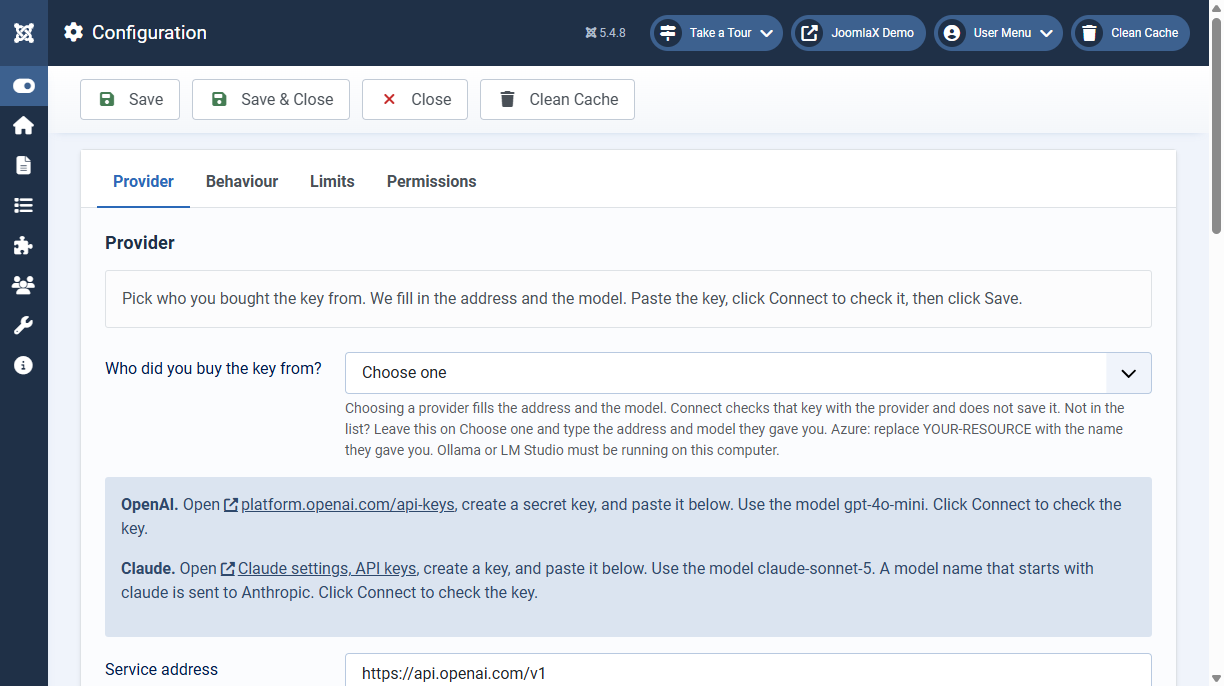
Approved Knowledge Base answers work with no key. Add a key when the chat should write replies that are not already approved. The key stays in Configuration. Your provider bills the account that owns the key.
- Open Components > Easy AI Assist > Configuration.
- Choose the provider. The address and the model fill in. Paste the key, click Connect to check that the provider accepts it, then click Save. Connect does not save the key.
OpenAI
- Choose OpenAI. The address becomes
https://api.openai.com/v1and the model becomesgpt-4o-mini. - Open platform.openai.com/api-keys and sign in.
- Create a secret key and copy it. OpenAI shows the full key only once.
- Paste it into Secret key and click Connect. Save when it says connected.
- Leave the model on
gpt-4o-mini. You can type another chat model from the OpenAI list if your account can use it.
Claude
- Choose Anthropic Claude. The model becomes
claude-sonnet-5. - Open Claude settings, API keys and sign in.
- Create a key and copy it. The key starts with
sk-ant-and is shown only once. - Paste it into Secret key and click Connect. Save when it says connected.
- Leave the model on
claude-sonnet-5. For a smaller model, typeclaude-haiku-4-5. Any model name that starts withclaudeis sent to Anthropic.
Other providers
Choose the name. The address and the model below fill in. Create the key on that provider's site, paste it, and click Connect. Connected means the key works. Then save. Ollama and LM Studio have no website key. Connect checks that the program on this computer answers.
- Google Gemini: model
gemini-2.5-flash. Create the key in Google AI Studio, API keys. - Groq: model
llama-3.3-70b-versatile. Create the key at console.groq.com/keys. - OpenRouter: model
openai/gpt-4o-mini. Create the key at openrouter.ai/keys. Keys start withsk-or-. - Mistral: model
mistral-small-latest. In Mistral Studio, open API keys and create a key. Steps: Mistral, create an API key. - DeepSeek: model
deepseek-chat. Create the key at platform.deepseek.com/api_keys. - xAI Grok: model
grok-3-mini. Create the key in the xAI console. - Qwen (Alibaba): model
qwen-plus. In Alibaba Model Studio (international), open API keys. The filled address is the international endpoint. - Moonshot Kimi: model
moonshot-v1-8k. Create the key at platform.moonshot.ai, API keys. - Together AI: model
meta-llama/Llama-3.3-70B-Instruct-Turbo. Create the key at api.together.ai, API keys. - Fireworks: model
accounts/fireworks/models/llama-v3p1-8b-instruct. Create the key at Fireworks, API keys. - Perplexity: model
sonar. In console.perplexity.ai, open API keys and generate a key. - Cerebras: model
llama-3.3-70b. Create the key at cloud.cerebras.ai. - SambaNova: model
Meta-Llama-3.3-70B-Instruct. Create the key at cloud.sambanova.ai/apis. - NVIDIA: model
meta/llama-3.1-8b-instruct. Sign in at build.nvidia.com and use Get API Key. - GitHub Models: model
openai/gpt-4o-mini. Sign in at GitHub Models and create a token for that catalog. - Azure OpenAI: model
gpt-4o-mini, or the deployment name in your Azure resource. ReplaceYOUR-RESOURCEin the address with that resource name. Copy the key from the Azure portal for the same resource. - Ollama on this computer: model
llama3.2. No website key. The preset writesollamainto Secret key. Ollama must be running on the same server as the site, with that model pulled. - LM Studio on this computer: the preset writes
lmstudiointo Secret key. Change the model to the name loaded in LM Studio. The local server must be running.