Theme Studio
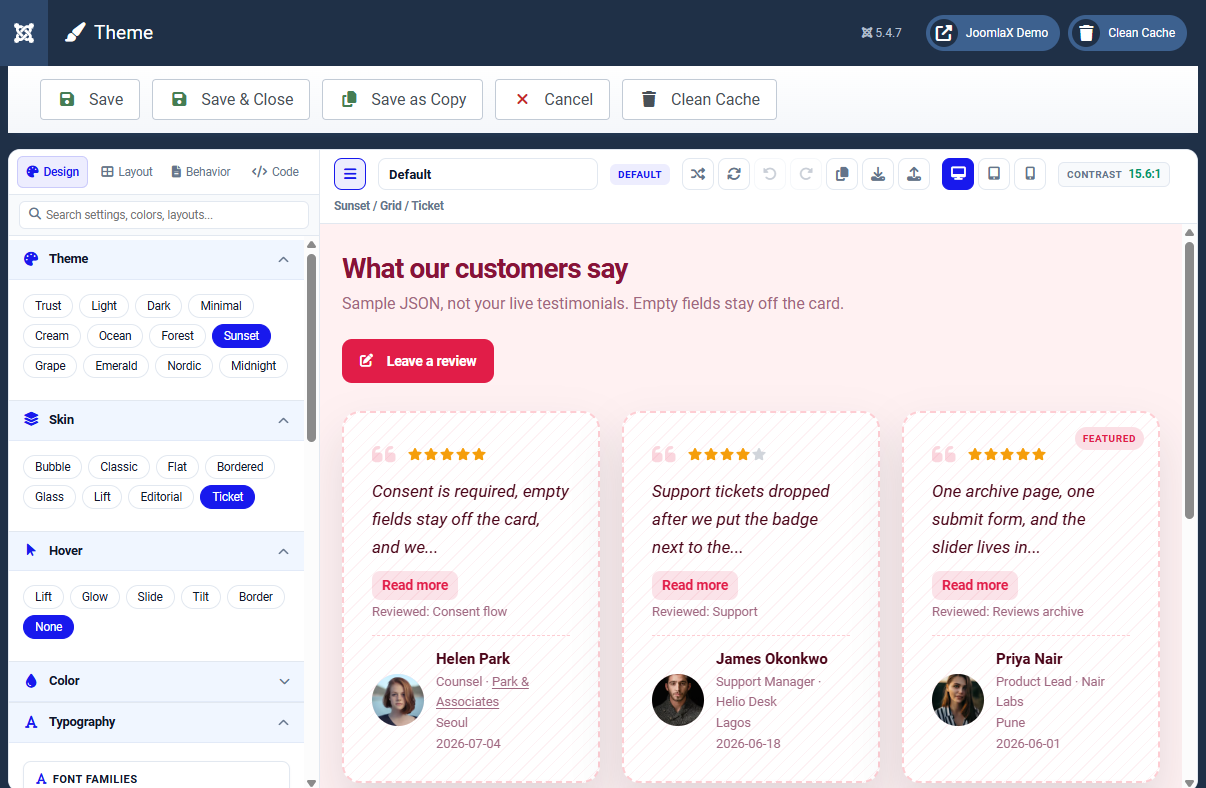
Click a design name in the Design list to open Theme Studio. This is the visual control room for colors, layouts, forms, and card content.
Four tabs
- Design: color presets, card skin, hover effect, colors, typography, quote icons
- Layout: grid/masonry/list style, columns, gaps, which fields show on cards
- Behavior: read-more mode, pagination, form mode (fixed/toggle/modal), submit rules
- Code: optional extra CSS for advanced users
Try this 5-minute walkthrough
- Click a preset such as Trust or Sunset.
- Change Skin to Bubble or Ticket.
- Open Layout and set desktop columns to 3.
- Switch preview to Phone to check mobile.
- Click Save & Close, then clear cache on the site.
Helpful tools
- Contrast meter: checks text readability
- Undo / Redo: step back through changes
- Copy look JSON: move a look to another design
Student tip
The preview uses sample cards, not necessarily your live testimonials. That is normal. Live pages pull real published rows using the same design.