General Settings
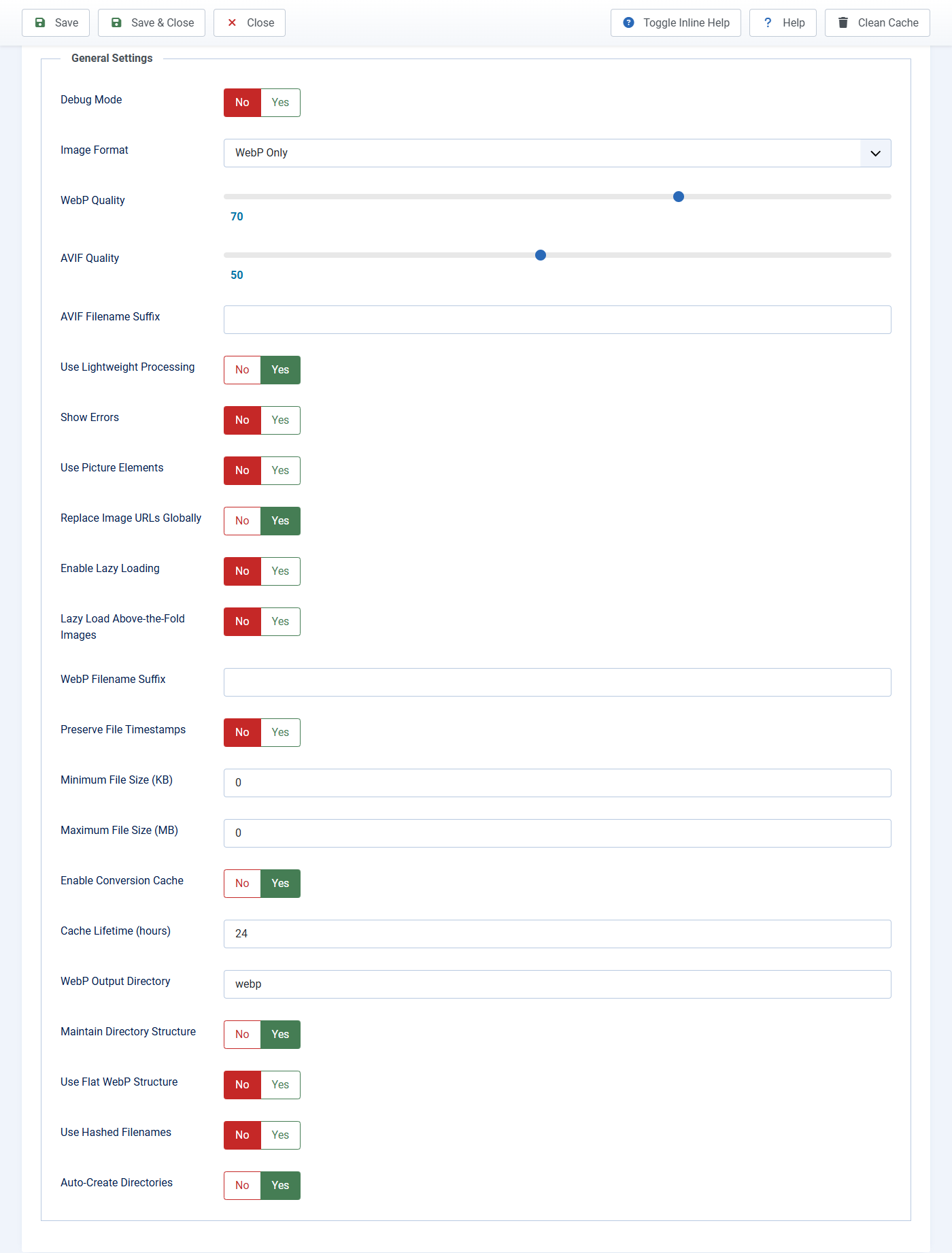
Open the plugin, then click the General Settings tab. Click Save after you change anything.
Start here
- Image Format: WebP Only for almost everyone. Choose Both only if you know the hosting can create AVIF files. AVIF Only is for experts.
- WebP Quality: Higher number = nicer picture and larger file. 80 is a good default. Do not set 100 unless you have a reason.
- AVIF Quality: Used only if format includes AVIF. 50 is a good default.
- Use Lightweight Processing: Keep Yes.
Leave these until you need them
- Replace Image URLs Globally: Turn Yes only if Google PageSpeed or sharing previews still show old JPG links after photos on the page already look converted.
- Enable Lazy Loading: Can help long pages. Keep Lazy Load Above-the-Fold Images on No so the top photos load at once.
- WebP Output Directory: Default
webpmeans new files go inimages/webp/. Do not change this unless you know you need another folder name. - Minimum / Maximum file size: Leave 0 unless tiny icons or huge photos should be skipped.
- Filename suffixes: leave empty.
Debug Mode and Show Errors print extra text on the public site. Use them on a test copy of the site, then turn them off.