Image Management
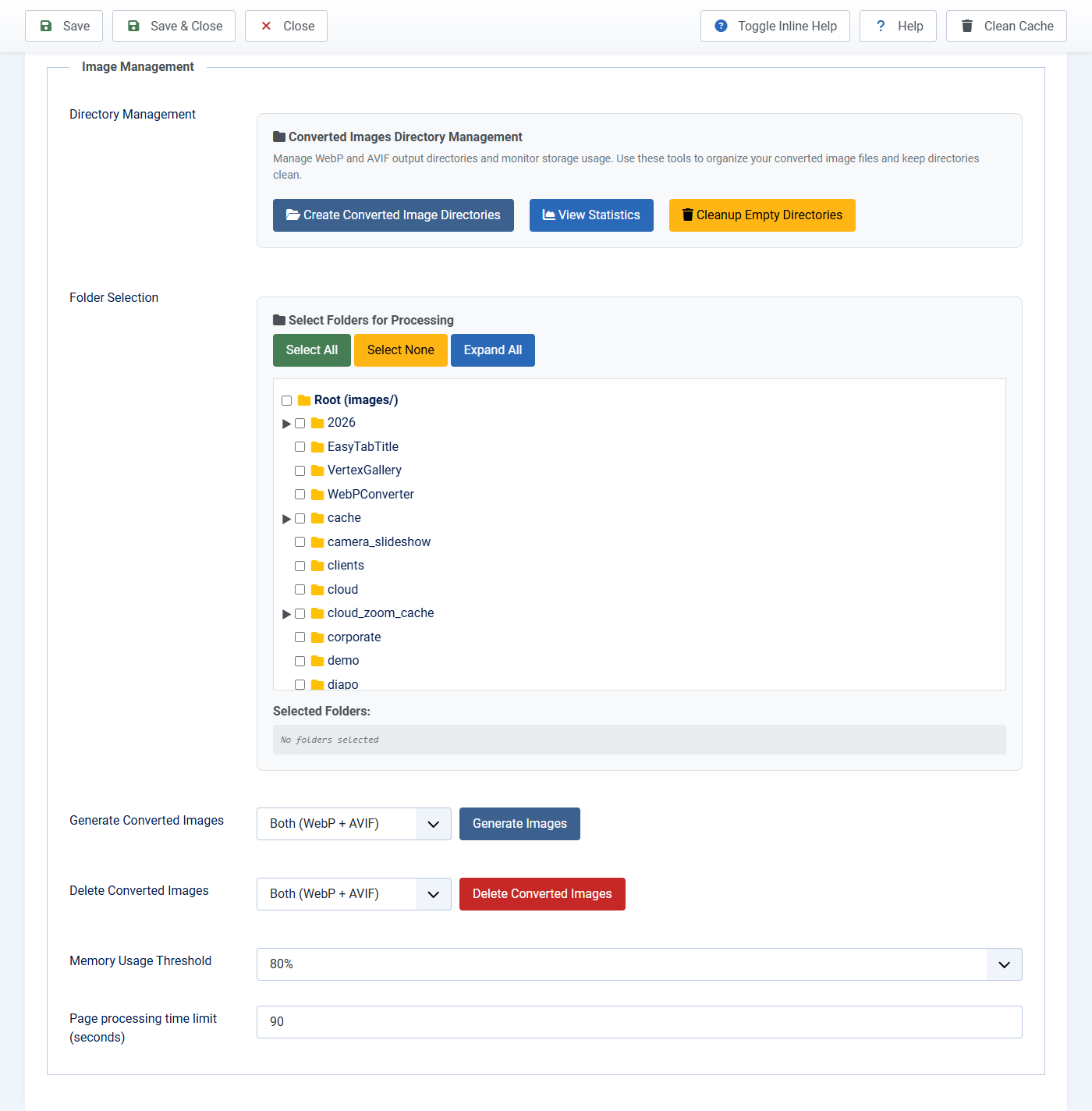
Use this tab to convert many photos in one go. You still need the plugin enabled. Click Image Management at the top of the plugin screen.
Convert one folder (recommended first test)
- Under Select Folders, tick one small folder that has a few photos. Root is the whole Images folder. Do not start with Root.
- If you cannot see your folder, scroll the list and click Load more folders.
- Next to Generate Images, choose WebP Only.
- Click Generate Images.
- Wait until you see 100% and a completed message. Do not close the tab.
- If it is taking too long, click Stop. Files already made stay. You can run Generate again.
If nothing is ticked, Joomla shows an alert. Tick a folder and try again.
Delete converted files (not originals)
- Tick the same original folder you generated (example:
stories, not onlywebp). - Choose WebP Only, AVIF Only, or Both.
- Click Delete Converted Images and confirm.
- Read the count. Original JPG and PNG files are never deleted.
Other buttons on this tab
- Create Converted Image Directories: makes the output folders if they are missing.
- View Statistics: how much space converted files use.
- Cleanup Empty Directories: removes empty leftover folders after a delete.
- Page processing time limit: default 90 seconds. Raise it if a huge homepage stops halfway.