How to
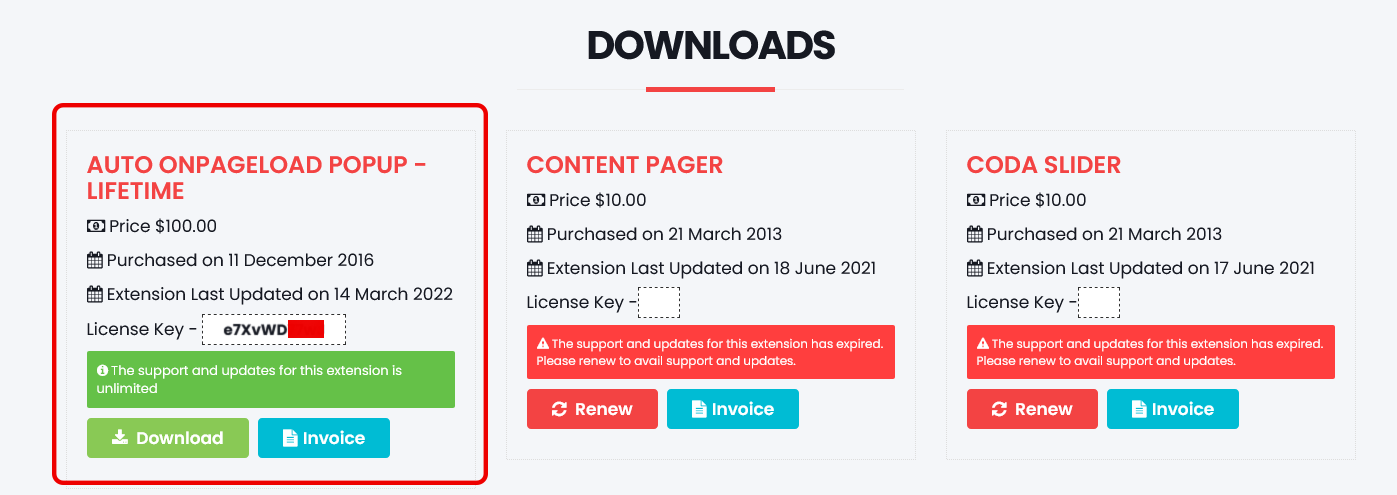
How to get the license key for the extension?
- Go to the Download Section of our store.
- Log in with your account (or create one using the same email you used when purchasing).
- Find your license key in the downloads section.
How to change or remove padding and margin around the popup?
Go to the Appearance tab and adjust the Content Padding and Content Margin settings. Set these to 0 if you want no space around your content.
How to add your own button style and background?
Replace one of the existing image files in the modules/mod_onpageload_popup/tmpl/images/ directory with your custom image. For example, replace close_button_1.png with your image, then select Style 1 in the module settings.
How to add a close button inside the popup?
Add this HTML code to your popup content:
<a href="#" class="closePopup">Close Button Text</a>
Any element with the class "closePopup" will function as a close button.
How to use Import/Export feature?
- Configure your popup module with all desired settings
- In the Import/Export panel, click "Export Configuration" to download your settings as a JSON file
- To reuse the configuration, click "Import Configuration" and select the previously exported JSON file
- The imported settings will automatically populate all module fields, saving you time on repetitive configurations
How to disable popup for mobile devices?
Go to Advanced Settings tab and set Disable for mobile devices to "Yes".
How to create a popup that appears only once per visitor?
- Go to the Module Settings tab
- Under Cookie Settings, set "After close stay hidden for" to "Days"
- Set "Cookie Duration" to the number of days you want (e.g., 30 for one month)
- Set "Set Cookie or Session On" to your preference (typically "On Closing Button")
How to show different popups to different traffic sources?
- Create multiple instances of the module, each with different content
- For each instance, go to the Referrer Targeting tab
- Enable Referrer Targeting and configure the appropriate referrer sources
- For example, one popup for Google traffic, another for Facebook, etc.
How to measure popup effectiveness?
- Go to the Google Analytics tab
- Enable Google Analytics tracking
- Configure which events to track
- Use the Conversion Element Selector to track specific actions
- Review the data in your Google Analytics dashboard to see which popups perform best