Targeting
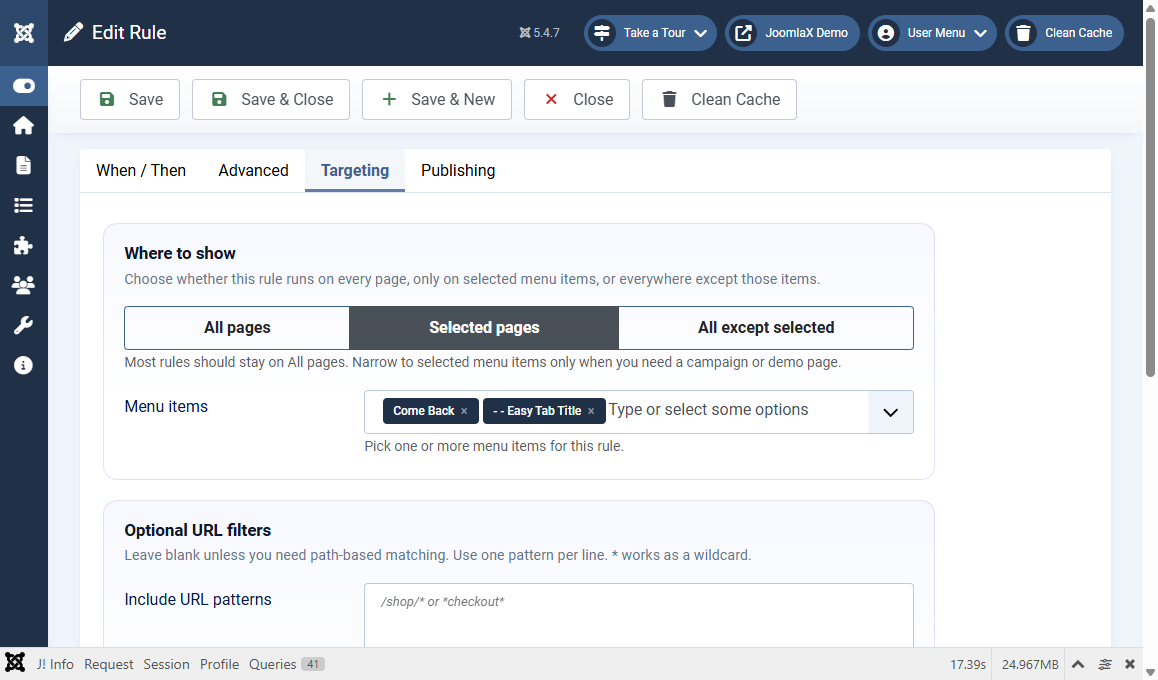
The Targeting tab decides where and for whom the rule runs.
Where to show
- All pages: every public page (good for first tests)
- Selected pages: only the menu items you pick
- All except selected: everywhere except the menu items you pick
When you use Selected pages or All except selected, fill Menu items.
Optional URL filters
- Include URL patterns: one pattern per line, for example
/shop/* - Exclude URL patterns: skip matching paths
- Use
*as a wildcard
Leave URL filters blank unless you need path matching beyond menu items.
Who can trigger it
- Devices: Desktop, Tablet, Mobile (default is all)
- Visitors: Everyone, Guests only, Logged-in users, or Selected user groups
Student tip
For demos, assign each rule to one menu item with Selected pages. For a live store homepage only, select that homepage menu item the same way.