When / Then
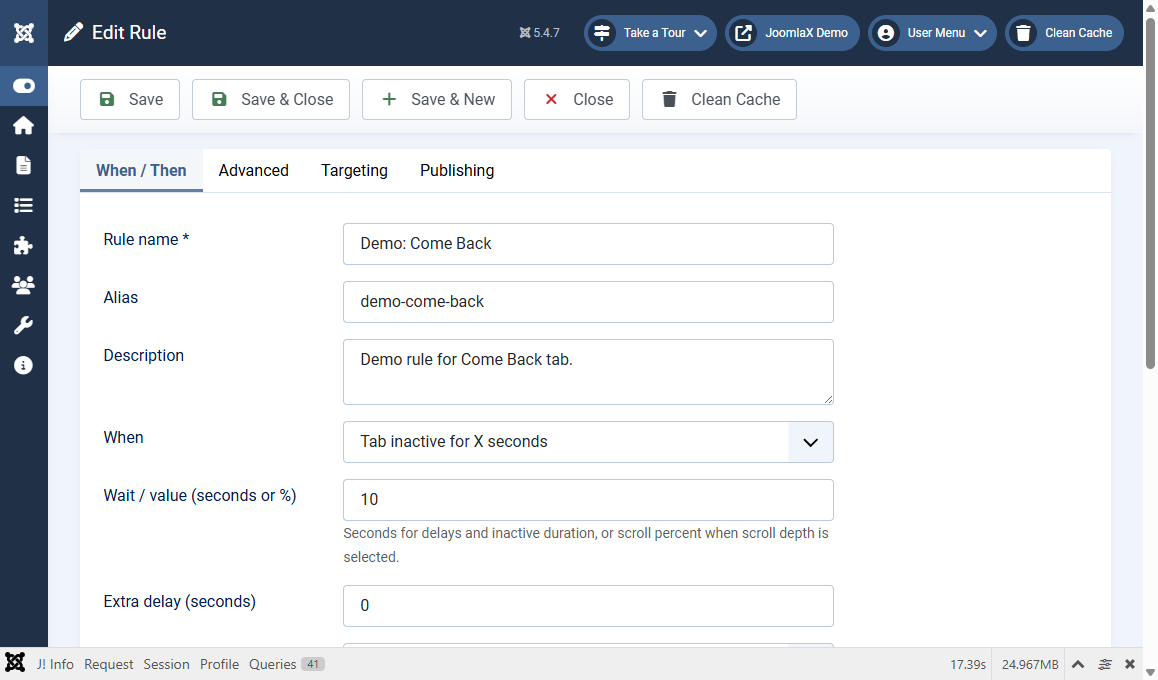
Click New or open an existing rule. The When / Then tab is the main recipe.
Basic identity
- Rule name (required): for example Come Back Homepage
- Alias: leave blank unless you need a fixed machine name
- Description: optional notes for you
When (the trigger)
- Page load
- After delay
- Tab becomes inactive
- Tab inactive for X seconds (common for Come Back)
- Tab becomes active
- Page inactivity
- Time on page
- Scroll depth
Use Wait / value for seconds (or scroll percent). Use Extra delay only if you want an added pause after the trigger.
Then (the effect)
- Effect: Static, Blink, Scroll, or Rotate
- Message: the tab text visitors will see
- Rotate messages: used when Effect is Rotate
- Speed (ms): how fast blink/scroll/rotate updates
- Until: stop when the visitor returns, after a duration, or never
- Welcome-back message: optional message when they return
Simple Come Back example
- When = Tab inactive for X seconds
- Wait / value = 10
- Effect = Blink
- Message = Come back!
- Until = Visitor returns
- Save