Overview
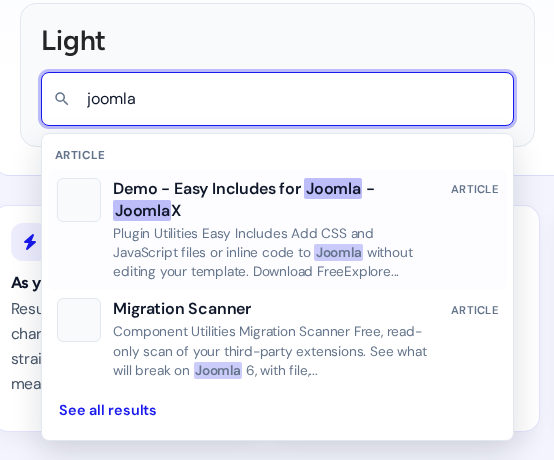
Easy Live Search adds a search box to your Joomla site. As visitors type, a dropdown shows matching results with a thumbnail, title, short snippet, and a type label. They can move through results with the keyboard and follow a See all results link to a full results page.
The store page is at https://joomlax.com/easy-live-search. A live demo is at https://demo.joomlax.com/easy-live-search.
What you get:
- Search as you type. After a short delay, results appear in a dropdown. You can set how many characters are required and how long to wait after the last keystroke.
- A choice of search engine. Smart Search is the default. It uses Joomla’s Smart Search index, so stemming, synonyms, and multi-word queries match the Smart Search results page. If Smart Search is disabled or the index is empty, the box falls back to Direct automatically. You can also choose Direct yourself.
- The sources you choose. Articles, categories, and contacts come from the Smart Search index in Smart Search mode. You can add Easy Directory listings, Easy Events Calendar events, and products from HikaShop, VirtueMart, J2Commerce, or Phoca Cart as extras when those extensions are installed. In Direct mode, you turn each source on or off yourself.
- Clear results. Optional thumbnails, snippets, highlighted matches, and type labels.
- Access-aware. Visitors only see published items they are allowed to see. In Smart Search mode, results follow Joomla Smart Search access.
- Your look. Light, Dark, or Auto theme, plus your accent color and corner radius.
- More than one box. Publish as many module instances as you need, each with its own sources and display settings.