Updates and the download key
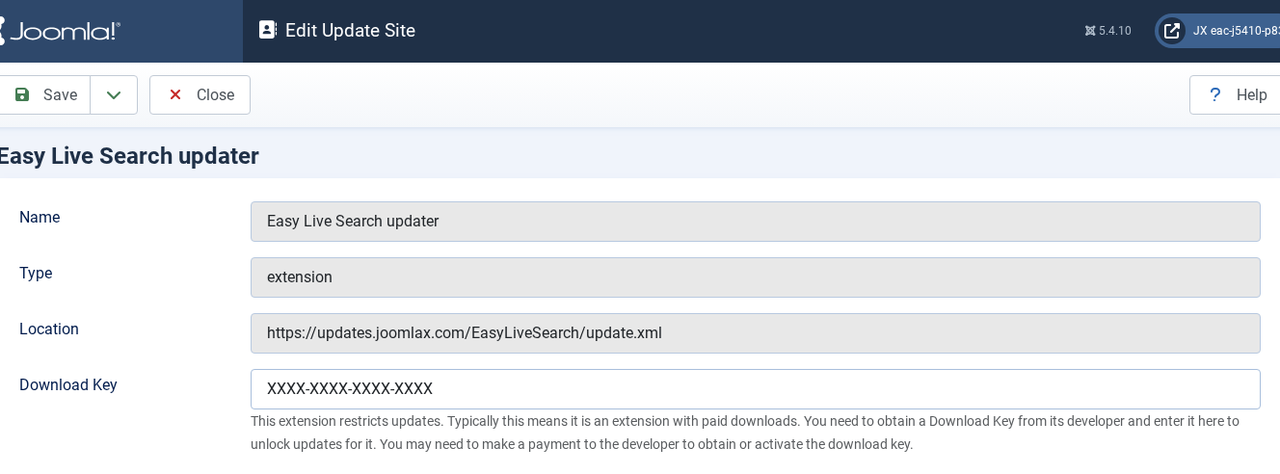
Updates are delivered through the JoomlaX update server. After you install the package, Joomla lists an update site named Easy Live Search updater.
- Copy the download key from your account at joomlax.com.
- Go to System → Update → Update Sites.
- Open the Easy Live Search update site and paste the key into Download Key.
- Save. Joomla can then offer Easy Live Search updates under System → Update → Extensions.
Without the key, Joomla cannot download the updates. You can still install a new package by hand from System → Install → Extensions; existing module settings are kept.
If you update a site that already had Easy Live Search before the Search engine setting existed, your other settings are kept. Search engine is set to Smart Search when the index already has content; otherwise it is set to Direct so the dropdown does not start empty. You can change this later on the Module tab, under the Search behavior settings.
For help, see JoomlaX support.