Create the module
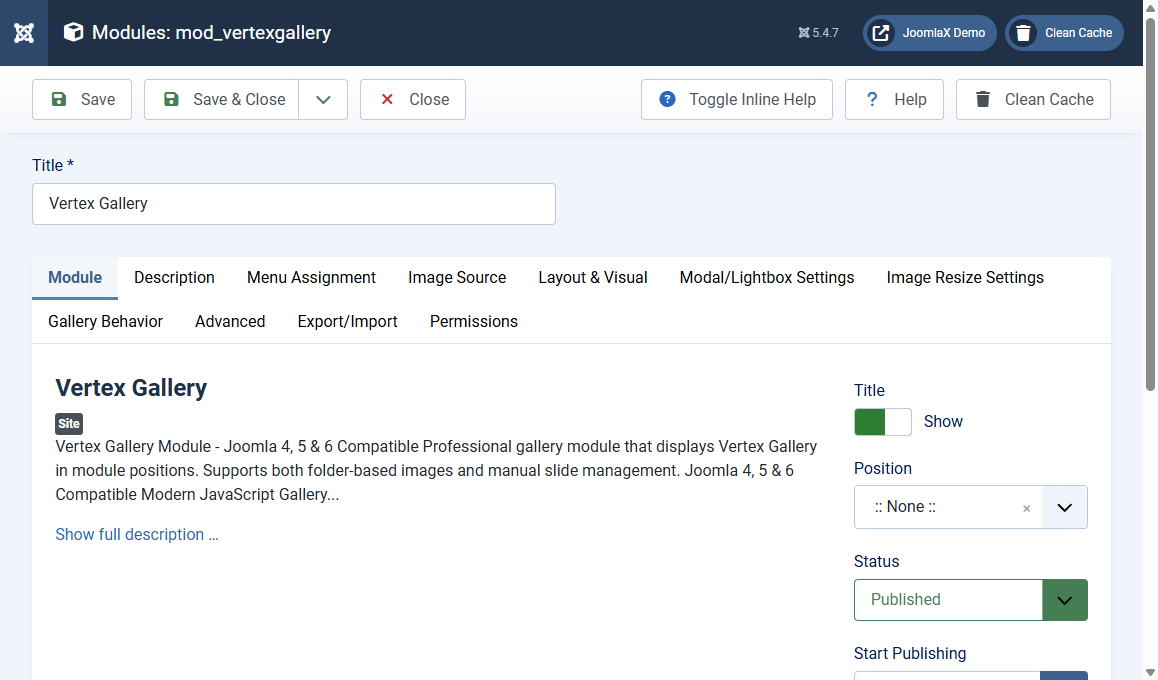
Use the module when the gallery should sit in a template position, not inside article text.
Create the module
- Go to Content > Site Modules.
- Click New.
- Select Vertex Gallery.
- Title: for example Home Gallery.
- Choose a Position that exists in your template.
- On Menu Assignment, choose the pages where it should appear.
- Set Status to Published.
- Set Title to Hide if the page already has a heading.
- Click Save.
Module tabs (in order)
- Module: title, position, status
- Menu Assignment: which pages show the block
- Image Source: Folder or Slides
- Layout & Visual: same family of options as the component
- Modal / Lightbox: same lightbox family
- Image Resize: thumbnail, modal size, WebP
- Gallery Behavior: randomize, single image preview
- Advanced: module class suffix, extra CSS
Student tip
If the module is missing on the site, check Published, Position, and Menu Assignment first. Those three cause most empty pages.