Lightbox
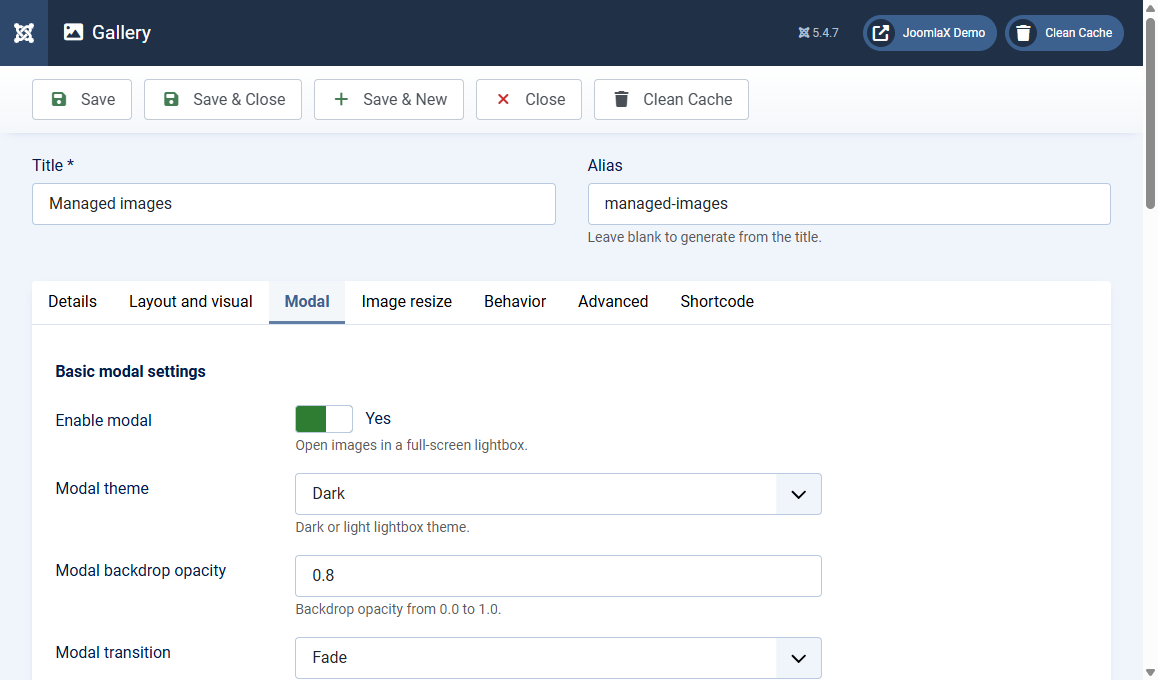
Open the Modal tab. Modal means the full-screen lightbox that opens when a visitor clicks a photo.
Basic
- Enable modal: Yes opens the lightbox. No keeps photos as a simple grid
- Modal theme: Dark or Light
- Modal backdrop opacity: 0.0 (clear) to 1.0 (solid). Default 0.8
- Modal transition: Fade, Crossfade, or Slide
- Swipe threshold: how far a finger must swipe on a phone (pixels). Default 50
- Disable right click in modal: Yes blocks the context menu inside the lightbox (soft deterrence, not DRM)
Controls (turn each on or off)
- Play / pause, Speed slider, Image count (example 1/9)
- Thumbnails strip, Thumbnails toggle, Thumbnail height, Thumbnail style (Crop or Natural)
- Fullscreen, Rotate, Flip, Zoom
- Theme toggle (let visitors switch dark and light)
- Autoplay progress bar
- Download, Share
Autoplay and captions
- Autoplay interval: time between slides in milliseconds (default 3000 = 3 seconds)
- Enable captions in modal: Yes shows title and description over the photo
On the site
Click a photo. Use arrows, thumbnails, or swipe. Press Escape or the X to close.