Managed images
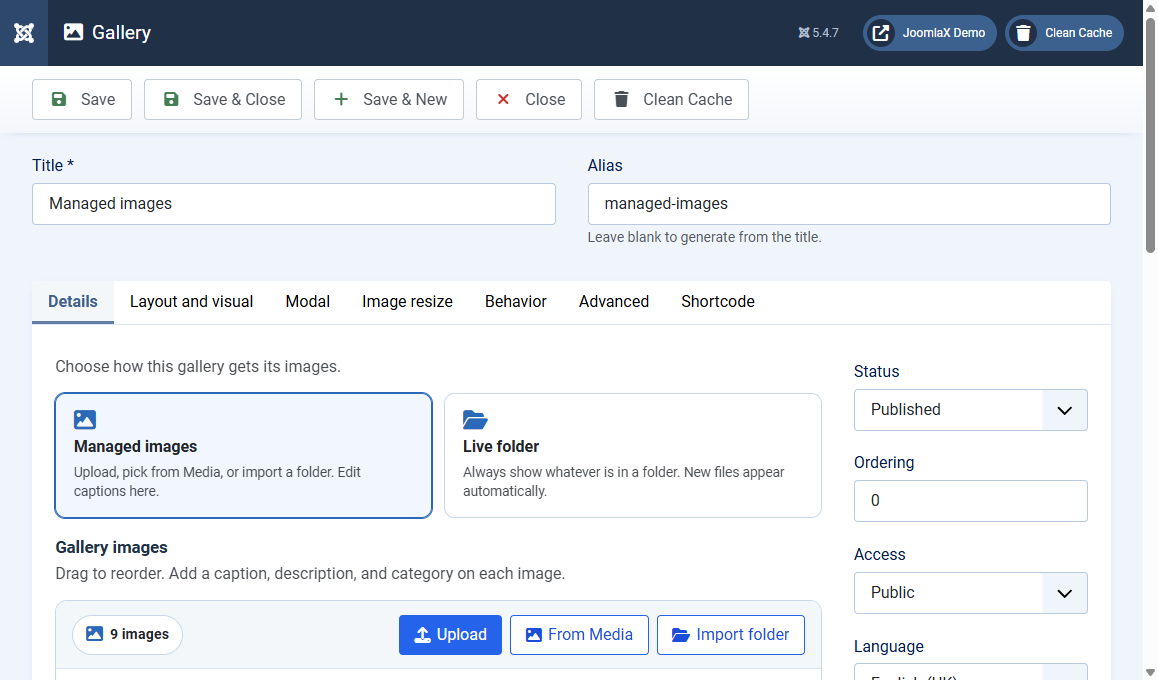
Click New or open a gallery. The Details tab is where photos live.
Title and alias
- Title (required): the name in the admin list, and the heading on a menu page if Show title is on
- Alias: leave blank to auto-create. If the alias is already used, Vertex Gallery saves a unique one and shows a notice
Choose Managed images
Click the Managed images card. Use this when you want to edit captions and order by hand.
Add photos (any of these)
- Drop zone: drag files from your computer onto Drop images here
- Upload: pick one or more files
- From Media: choose photos already in Content > Media
- Import folder: type a path such as
images/gallery, optional subfolders as categories, optional captions from filenames
Edit each photo
- Caption: title on the card and in the lightbox
- Description: extra line under the caption
- Category: filter name, for example Desert or Forest. Leave empty if you do not need filters
- Drag: reorder photos
- Remove: delete one photo from this gallery (the file in Media usually stays)
Publishing (right column)
- Status: Published or Unpublished
- Ordering, Access, Language
Click Save to stay on the form, or Save & Close to return to the list.