Mailboxes and email fetch
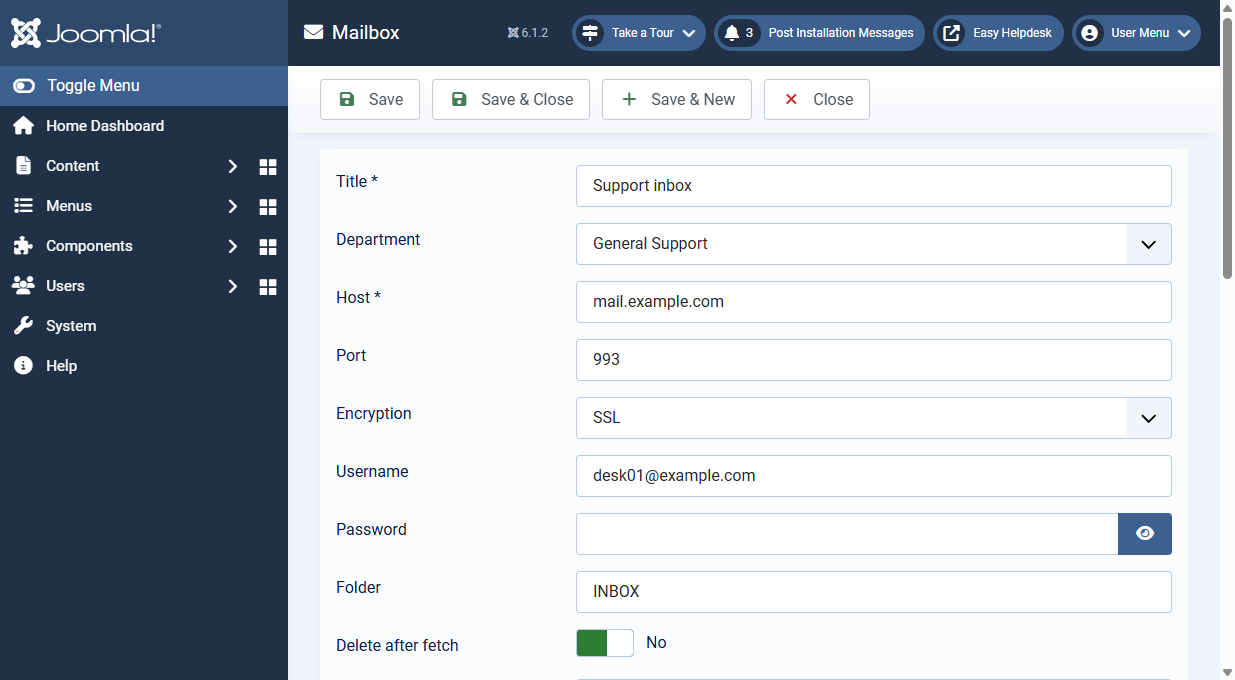
Easy Helpdesk can create tickets and replies from email using IMAP over a plain socket (no PHP imap extension).
Multiple mailboxes (recommended)
- Open Mail and routing > Mailboxes.
- Create a published mailbox with host, port, encryption (none, SSL, TLS), username, password, folder (default INBOX), and department. Use Mail service presets on the edit screen to apply IMAP defaults for Gmail, Microsoft 365, Zoho, and other common hosts.
- Set Delete after reading carefully: No marks messages read (safer while testing).
- Repeat for each support address.
Legacy single mailbox (Configuration)
The Email fetching tab still supports one mailbox in component options:
- Read tickets from a mailbox switch
- Host, port, encryption, username, password, folder
- Department for mailed in tickets (or first published department)
- Delete messages after reading
- Cron key: call
index.php?option=com_easyhelpdesk&task=mail.fetch&key=YOUR_KEYon the site without logging in. Use Generate for a random key, or leave empty to allow administrator Fetch email only. - Mail service presets: accordion under Email fetching with one-click IMAP defaults for popular providers
Fetch runs all published mailboxes plus the configured legacy mailbox when enabled.
How replies attach to tickets
Inbound mail that quotes the ticket number in the subject lands on the existing ticket. Other messages open new tickets. Routing rules can adjust department, priority, type, tags, or mark spam.
Manual fetch
Use the Fetch email button in the administrator when testing. The report shows new tickets, replies, and skipped messages.