Tickets list
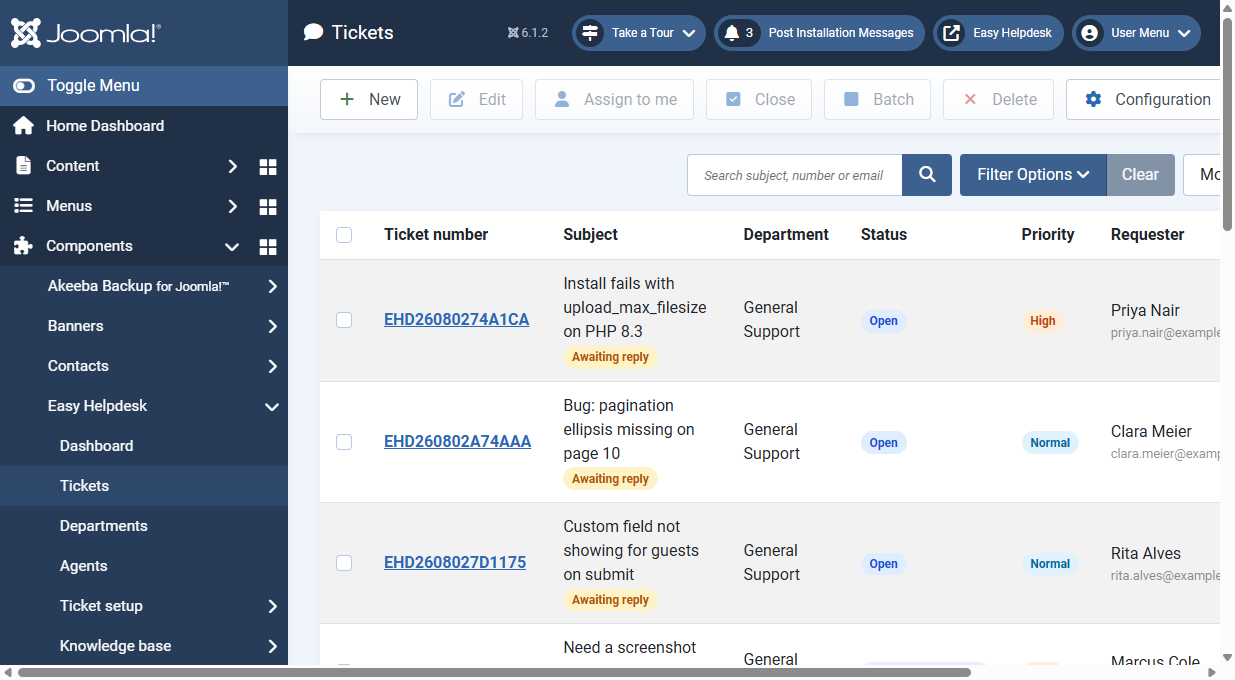
The ticket list is the main triage screen. Use filters to narrow the queue, then batch update or open a ticket.
Search and queue filters
- Search: subject, ticket number, or requester email
- Queue: Any, Open tickets, Awaiting reply, Unassigned, Assigned to me, High priority, SLA breached, Opened today, Spam, Trash
- Status, assignee, tag, type, priority, department: each narrows the list
Sorting and paging
- Sort by created date, last reply, subject, status, or ticket number
- Change list limit with the standard Joomla limit box
List indicators
- SLA state: due, paused, breached, or complete
- Spam flag on junk tickets
- Tags and ticket type when set
Batch toolbar actions
Select several tickets, then use the batch bar to:
- Change status, priority, department, or owner
- Assign to me
- Close selected tickets
Single ticket actions from the list
Open a row to edit the full ticket. Soft-delete moves tickets to Trash (queue filter); Restore brings them back, or Delete permanently removes them when your ACL allows.
Department scoping
Agents only see tickets in their departments. Managers and administrators see the wider desk according to permissions.